
Appearance
Advanced
Manual Guide Triggers
Manual guides give you full control over when a guide is shown — you decide the trigger instead of relying on URL matching. Common use cases:
- A "Take the tour" button in your app's UI
- Launching a guide after a specific user action (e.g. creating their first project)
- Help tooltips triggered from a "?" icon
Step 1 — Set the guide to Manual launch
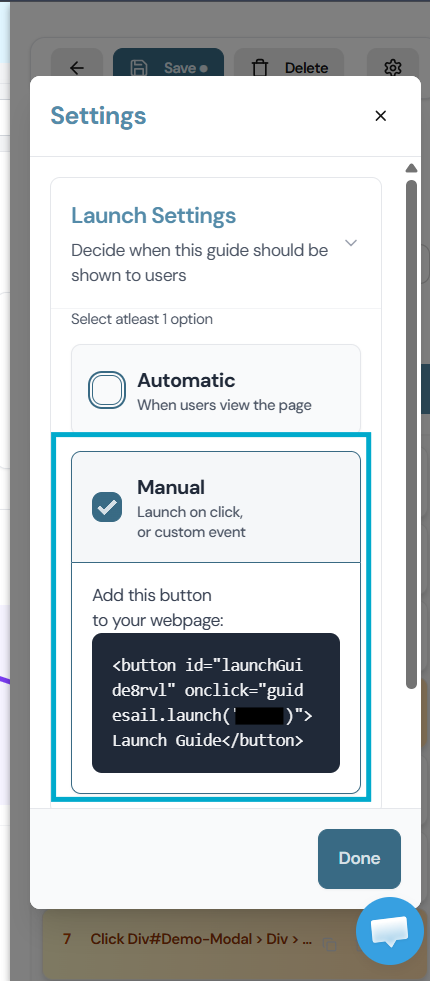
In the GuideSail Builder, open the guide's Settings (gear icon on the top right) and set Launch Settings to Manual.
Now your guide is configured to be launched whenever you want. There is a code snippet included which adds a button to your page, which launches this guide.
Note: The guidesail.launch(guideid) part is what you can use to launch the guide however you want in the logic of your app.
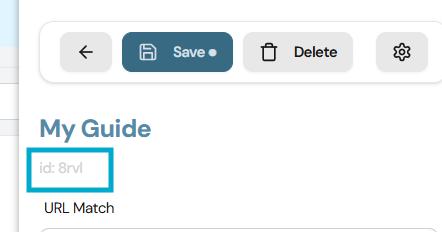
Save the guide. Note the Guide ID. You can find the Guide ID in the guide settings panel or in the URL when the guide is open in the Builder.
Step 2 — Launch the guide from your code
Make sure GuideSail is already initialized on the page (see [[Installation/Installing GuideSail on Your App]]), then call launch with the guide ID:
npm package
js
import guidesail from 'guidesail';

guidesail.sail('YOUR_API_KEY');
guidesail.launch('YOUR_GUIDE_ID');
ES module via jsDelivr
If you're using the CDN install, include the stylesheet once in your HTML and initialize GuideSail from the module script:
html
<link rel="stylesheet" href="https://cdn.jsdelivr.net/npm/guidesail@1/guidesail.css" />

<script type="module">
  import guidesail from "https://cdn.jsdelivr.net/npm/guidesail@1/+esm";

  guidesail.sail("YOUR_API_KEY");
  guidesail.launch("YOUR_GUIDE_ID");
</script>
In practice, sail() is called once on page load and launch() is called later on demand — for example, on a button click.
Example: "Take the tour" button
html
<button onclick="guidesail.launch('YOUR_GUIDE_ID')">Take the tour</button>Or in a JS framework:
jsx
<button onClick={() => guidesail.launch('YOUR_GUIDE_ID')}>
  Take the tour
</button>
Notes
guidesail.sail()must be called beforeguidesail.launch(). Initialize on page load, calllaunch()whenever you need it.- Manual guides bypass URL matching entirely — they run regardless of which page the user is on.
- Once-only logic does not apply to manual guides. Each call to
launch()runs the guide. - The guide must be saved in GuideSail.
launch()fetches it from the API by ID at call time.
Listening to guide events
GuideSail emits CustomEvents on window as guides start, progress, and end. See [[Custom Events]] for the full reference and examples.