Appearance
Building Guides
Guide Settings
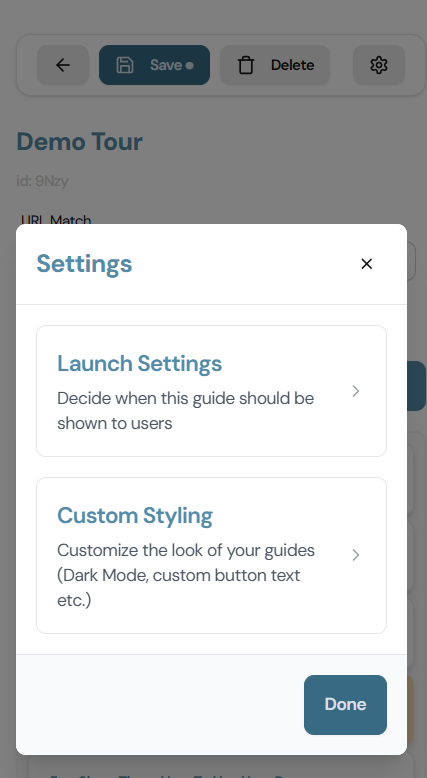
Access guide settings by clicking the Settings icon at the top of the guide editor in the Builder.
Title
A name for your guide. This is not shown to your users — it's only for your reference in the Builder and dashboard.
Launch Settings
Controls when and how the guide is shown to users.
Automatic
The guide launches automatically when a user visits the matching URL. Two sub-options:
| Option | Behavior |
|---|---|
| Show every time | The guide runs on every visit to the matching URL. |
| Once only | The guide runs once per visitor and is not shown again. Useful for onboarding flows. |
Manual
The guide is not triggered by URL. Instead, you launch it with a function call in your app's code — for example, when the user clicks a "Take the tour" button. See [[../Advanced/Manual Guide Triggers]] for the full setup.
URL Match
Defines which page the guide appears on for automatic guides.
By default this is pre-filled with the URL of the page you had open when you created the guide. In most cases you can leave it as-is.
For advanced cases — like matching a dynamic route — see [[URL Matching]].
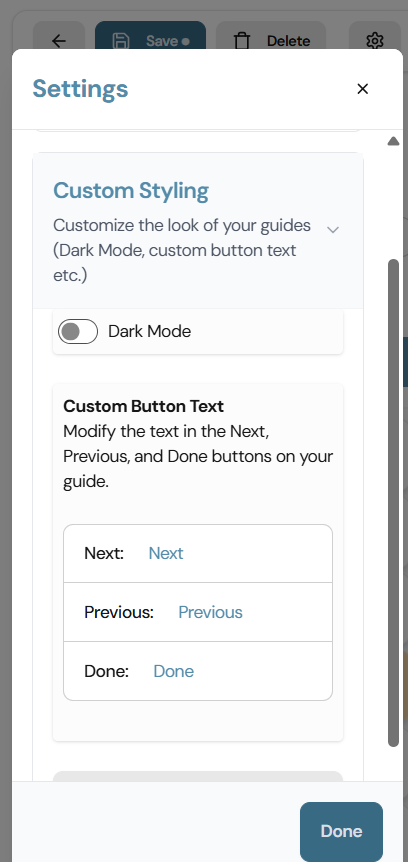
Custom Styling
Override the default button labels shown to users as they move through the guide.
| Field | Default | Description |
|---|---|---|
| Next button | Next | Label for the button that advances to the next step. |
| Previous button | Previous | Label for the back button. |
| Done button | Done | Label for the button on the final step. |